
A software update appears while you’re in the middle of something. You have work to finish, tabs open, and no interest in restarting your computer. “Remind me later” feels like a reasonable choice.
But how many times does later turn into tomorrow? Or next week?
We need to take those notifications more seriously, especially when an update fixes a security vulnerability—a weakness in the software that an attacker could exploit. Attackers are getting faster, and AI is helping them take advantage of the time between a fix becoming available and people actually installing it.
A security patch is an update that fixes a vulnerability. A patch only protects you after you install it.
Attackers are watching the updates, too
In its November 16, 2026 report, Google Threat Intelligence Group describes an automated system called exploit_agent. It compares web application code before and after a patch, identifies potential vulnerabilities, and develops and launches attacks without a human directing each step.
The troubling part is that a security fix can help an attacker understand what was broken. Anyone still running the older version may remain exposed.
Microsoft calls the time between a fix becoming available and reaching devices the “patch gap”. It warns that AI can speed up the development of attacks against publicly known vulnerabilities.
My takeaway: make installing security updates a priority across all the software you use.
What Google’s chart shows
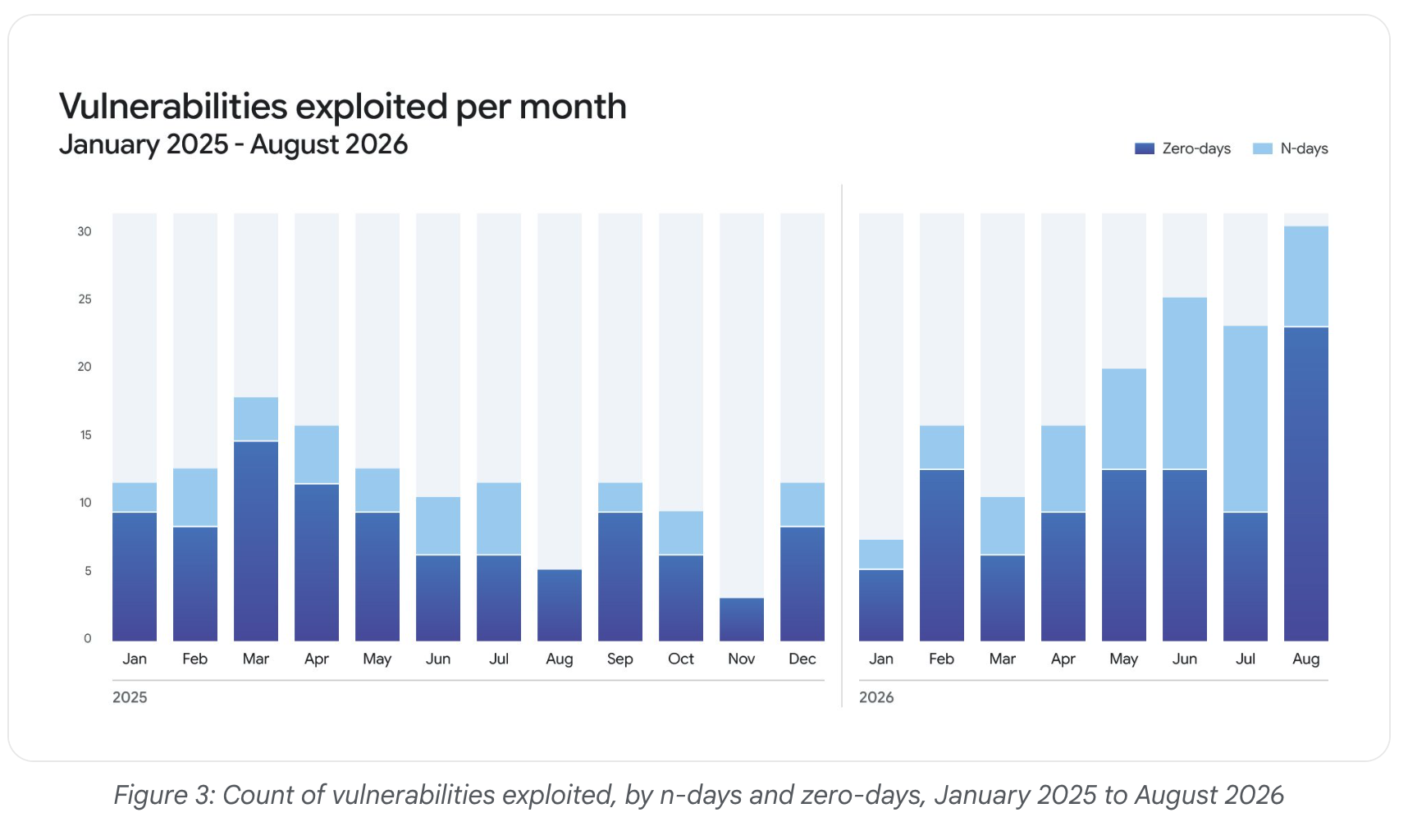
The monthly totals fluctuate, but the bars become notably taller toward the end of the period. The chart tracks exploited vulnerabilities—not the number of attacks or people affected. It also doesn’t establish that AI caused every increase.
Two terms help explain what you’re looking at:
- Zero-day exploitation: Attackers exploit a flaw before an official patch is available.
- N-day exploitation: Attackers exploit a publicly known flaw. When a patch is available, systems that haven’t installed it may remain vulnerable.
Microsoft’s explanations of zero-day vulnerabilities and the patch gap offer more detail.
We can’t install a fix that hasn’t been released. We can make sure we install the fixes that have.
Update more than your operating system
Windows, macOS, iOS, and Android updates deserve your attention. So do your browser, email software, PDF reader, office applications, browser extensions, and security software.
And then there are the devices we tend to forget about: the router, printer, smart TV, security camera, and other connected equipment. Their built-in software, often called firmware, needs updates, too. The Federal Trade Commission (FTC) recommends keeping router software current and checking whether your internet provider handles updates automatically.
If you manage a website, include its platform, plugins, themes, and server software in that routine.
Here’s the approach I recommend:
- Turn on automatic updates. Enable them for your operating system and applications wherever available. Check that the updates are actually completing.
- Treat security fixes as a priority. Install them promptly. If the software maker says a vulnerability is already being exploited, treat that update as urgent.
- Finish the restart or relaunch. If an update asks you to restart the device or reopen the browser, complete that step. Downloading an update doesn’t always mean it has been fully installed.
- Check your connected devices. Include your router and other connected equipment. Look in their official apps or settings for update options.
- Keep track of support dates. If a product no longer receives security fixes, plan to move to a supported version or replacement.
This approach follows guidance from the U.S. Cybersecurity and Infrastructure Security Agency (CISA) and the FTC: turn on automatic updates and install security fixes promptly.
For a work device, follow your IT team’s process and respond promptly when an update or restart is required. Critical business systems may need testing and a coordinated rollout. That process needs a clear owner and a deadline.
A major feature upgrade may require more planning than a routine security patch. Use a supported version that continues receiving security fixes while you plan the upgrade.
Unique passwords still matter
Patching software is one part of protecting yourself. Your accounts need attention, too.
Use a different password for every account. If you reuse a password and one service is compromised, attackers can try that same password elsewhere.
A password manager makes this much easier. It can generate long, unique passwords and remember them for you. Personally, I’ve used Dashlane for years without issues. Choose a reputable password manager that works for you, and protect it with a strong, unique master password and multifactor authentication, as CISA recommends.
Choose stronger two-factor authentication
Enable two-factor authentication, or 2FA, wherever it’s available. It adds another check beyond your password.
If you have a choice between a text message and an authenticator app such as Google Authenticator, choose the app! Text messages depend on your phone number and mobile carrier. In a SIM swap, a criminal takes control of your number by getting it transferred to a SIM card they control. They may then receive your verification texts. An authenticator app generates codes without relying on text-message delivery.
Those app codes can still be stolen through phishing—for example, if a fake sign-in page tricks you into entering one. Where supported, passkeys or hardware security keys offer stronger, phishing-resistant protection. If text messages are the only option, they’re still better than having no second factor. See CISA’s comparison of authentication methods for more detail.
Save your recovery codes somewhere secure so losing your phone doesn’t also mean losing access to your accounts.
Make the next update count
Start with the devices you use every day. Check for updates, complete any pending restarts, and make sure automatic updates are enabled. Then check the router and the applications that don’t update themselves.
Get updates through the device’s settings, the application’s own updater, an official app store, or the software maker’s website. Be suspicious of unexpected browser pop-ups telling you to download a security fix. The FTC’s guidance on software updates explains how to update safely.
Keeping everything current takes a little attention. Recovering from a compromised account or device can take a lot more.
The next time a legitimate security update appears, give it the attention it deserves. The attacker doesn’t need you to ignore it forever. A delay may be enough.